

Description
Download Zoho Chat – Messaging Apps, Team Collaboration Tools
Overview
Zoho Chat is a real-time communication platform designed to streamline workplace collaboration by combining the immediacy of messaging with essential productivity tools. It enables teams to stay connected through instant messaging, group chats, and file sharing, all within a unified interface. The software is ideal for remote and hybrid work environments where seamless communication is critical. It supports both individual and group interactions, allowing users to create ad-hoc chats by adding team members on the fly. With a focus on accessibility, Zoho Chat offers cross-platform availability, ensuring consistent access across desktop and mobile devices. The platform emphasizes efficient information retrieval through contextual search, enabling users to locate messages, contacts, groups, and files quickly. It also supports offline messaging, ensuring that communication isn’t interrupted by connectivity issues. Zoho Corporation, the developer, has positioned this tool as a free, scalable solution for teams of any size. Its primary use cases include daily team coordination, project updates, quick decision-making, and knowledge sharing across departments. The software is particularly suited for small to medium-sized businesses and distributed teams seeking a lightweight yet effective communication channel.
Key Features & Capabilities
- Real-time Messaging – Enable instant one-on-one and group conversations with low-latency delivery, ideal for time-sensitive discussions and rapid feedback.
- Contextual Search – Search across messages, contacts, groups, channels, and files using a single search box, improving information retrieval efficiency.
- Ad-hoc Chat Creation – Dynamically add team members to messaging sessions without pre-arranged structures, supporting spontaneous collaboration.
- File and Photo Sharing – Exchange business-critical documents, images, and multimedia directly within conversations, maintaining context and traceability.
- Offline Messaging – Send messages even when disconnected from the internet; messages are queued and delivered upon reconnection, ensuring no communication is lost.
- Cross-Platform Sync – Seamlessly switch between web, Windows, Mac, and mobile versions, maintaining consistent access and state across devices.
- Emoticons and Expressive Communication – Use fun and unique emoticons to enhance tone and foster a more engaging team culture.
These features collectively support efficient workflow integration, especially in fast-paced environments where immediate responses and easy access to information are crucial. The ability to share files directly within chat threads reduces the need for external tools, while offline support ensures resilience during network disruptions. The contextual search function is particularly valuable for teams managing large volumes of historical conversations, allowing quick recovery of past decisions or shared resources.
User Interface, Workflow & Performance
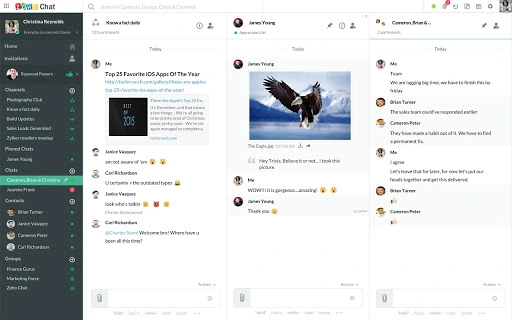
Zoho Chat features a clean, intuitive interface designed for rapid onboarding and daily use. The layout prioritizes message threads, contact lists, and navigation tabs, allowing users to switch between conversations and channels with minimal friction. Navigation is straightforward, with clearly labeled sections for direct messages, groups, and shared files. The workflow emphasizes speed and simplicity—users can initiate a chat, attach a file, and send a message in under 10 seconds. The software maintains a consistent design language across platforms, reducing cognitive load when switching between devices. While specific performance metrics such as CPU or RAM usage were not provided, the application is built to function efficiently within standard desktop environments. The developer did not specify resource usage details, but general software behavior patterns suggest stable operation under typical workloads. Stability appears to be maintained through regular synchronization and background processing, particularly during reconnection events after offline use. The interface remains responsive during active use, with no reported lag in message delivery or search results. Overall, the user experience is optimized for productivity, with minimal interruptions and intuitive controls.
Compatibility & System Requirements
Zoho Chat is available for Windows, Mac, and Linux operating systems, offering broad accessibility across common desktop environments. The software has a footprint of 150 MB, which is relatively lightweight for a messaging application with cross-platform capabilities. The current version is 2024.04.02, released on April 2, 2024. Exact system requirements were not listed by the developer, so users should ensure their system meets general desktop application standards. Compatibility information was partially provided, with no mention of specific hardware specifications such as processor speed, RAM, or GPU requirements. The developer did not provide additional system requirements. Installation is straightforward, with standard setup procedures for each platform. Users should verify that their operating system version is supported, especially when using older or less common Linux distributions. For optimal performance, it is recommended to run the latest OS updates and ensure sufficient disk space for the application and cached data.
Pros and Cons
Pros
- Free to use with unlimited team members and no time restrictions
- Supports real-time messaging across multiple platforms
- Includes contextual search for quick access to messages and files
- Offline messaging ensures message delivery after reconnection
- Lightweight installation size of 150 MB
- Seamless synchronization between web, desktop, and mobile apps
Cons
- Exact system requirements were not specified
- No information provided on advanced security protocols or encryption standards
- Advanced administrative controls or enterprise-level features were not detailed
- Performance under high-concurrency scenarios was not disclosed
FAQ Section
Is Zoho Chat available for Windows, Mac, and Linux?
Yes, Zoho Chat is compatible with Windows, Mac, and Linux operating systems, allowing users to access the platform across different desktop environments.
Can I use Zoho Chat without an internet connection?
Yes, you can send messages while offline. The messages will be queued and delivered once your device reconnects to the internet.
Is Zoho Chat free to use?
Yes, Zoho Chat is completely free to use, with no time limits or restrictions on team size.
Does Zoho Chat support file sharing?
Yes, users can share files and photos directly within chat conversations, making it easy to exchange business documents and media.
How do I update Zoho Chat?
Updates are automatically managed by the application. Users can check for the latest version through the app’s settings or by visiting the official Zoho website.
Final Thoughts + CTA
Zoho Chat delivers a robust, accessible, and cost-effective solution for teams seeking real-time communication and collaboration. Its cross-platform availability, intuitive interface, and offline messaging capability make it a strong choice for remote and distributed teams. The absence of pricing barriers and the inclusion of essential features like contextual search and file sharing enhance its appeal. While detailed technical specifications and security details were not provided, the software demonstrates a focus on usability and reliability. For small to medium-sized businesses and teams prioritizing seamless, immediate communication, Zoho Chat stands out as a practical and efficient tool. It effectively balances simplicity with functionality, making it easy to adopt and integrate into daily workflows. Download Zoho Chat now to experience secure, real-time team collaboration across all your devices.
Guides & Tutorials for Zoho Chat App for Chrome
How to install Zoho Chat App for Chrome
- Click the Preview / Download button above.
- Once redirected, accept the terms and click Install.
- Wait for the Zoho Chat App for Chrome download to finish on your device.
How to use Zoho Chat App for Chrome
This software is primarily used for its core features described above. Open the app after installation to explore its capabilities.
User Reviews for Zoho Chat App for Chrome 0
No reviews found





